The Kasa HS200 uses its Wi-Fi status LED to show connection, configuration and update activity. The guide below explains the indicators and the separate RESTART and RESET operations.
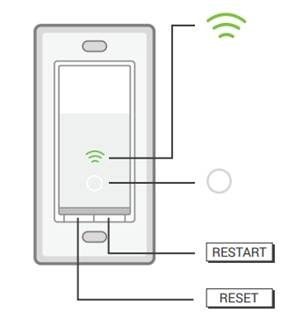
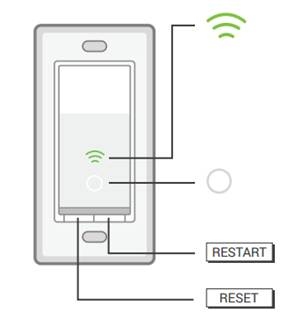
HS200 layout
Reading the Wi-Fi status LED
- Alternating amber and green blinks: The switch is in App-Config mode.
- Steady green: A Wi-Fi connection has been established.
- Blinking amber: A reset or firmware update is underway.
- Steady red: There is no Wi-Fi connection; this is the most common indicator of a connectivity problem.
The Wi-Fi status LED switches off automatically within 30 seconds after successful configuration.
What the White Round LED does
When the connected light is off, the White Round LED illuminates so you can locate the switch in the dark.
Using RESTART and RESET
- Restart without changing settings: Press RESTART. During reboot, the Wi-Fi LED turns amber, then blinks green until the switch reconnects.
- Reconfigure Wi-Fi: Hold RESET for about 5 seconds, until the Wi-Fi LED alternates between amber and green. This opens App-Config mode.
- Restore factory settings: Hold RESET for about 10 seconds, until the Wi-Fi LED rapidly blinks green.
A factory reset erases all configuration settings but leaves the cloud account linked. To unlink it, delete the device from the original account in the Kasa app.