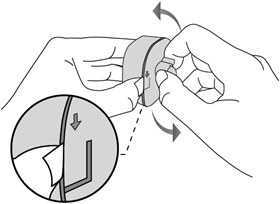
Replacing Batteries in Tapo Motion, Door/Window and Human Presence Sensors
Restore a Tapo sensor with a low or depleted battery by following the procedure for its sensor type. Cover removal differs by model, and replacement batteries must be positioned correctly.

Connecting Tapo Sensors, Buttons and Switches to a Tapo Hub
Pair Tapo Sub-1G devices with an online Tapo hub through the Tapo app or the hub’s SYNC button. The instructions use the Tapo T100 motion sensor as an example and include pairing-button timings for supported hubs.

Choosing a Motion Sensor for Your Homey Smart Home
Compare Homey-compatible motion sensors for lighting automation, security and everyday Flows. The options span several wireless protocols, with different detection areas, power requirements, environmental sensors and outdoor ratings.

Smart Sensors and Remote HVAC Control: A Practical Retrofit Guide for Commercial Buildings
Commercial buildings can gain room-level HVAC visibility and remote control without installing a full building automation system. Successful retrofits depend on reliable sensor data, actionable fault rules, suitable equipment connections, and a staged rollout—not simply adding connected controllers.
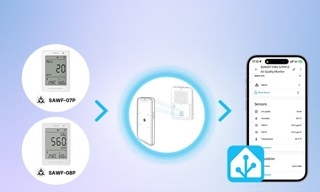
Choosing Air Quality Sensors and Building Automations in Home Assistant
Learn which air quality measurements matter, how to select and connect Home Assistant sensors, and how to automate ventilation, purification, and humidity control. The guide also compares SONOFF AirGuard models and explains practical thresholds, placement, and sensor limitations.
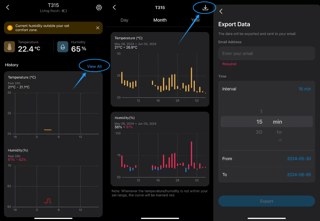
Exporting Tapo Sensor Temperature and Humidity Records
Export Tapo sensor history as a CSV file for local storage or further analysis. Follow the steps for temperature and humidity sensors or the Smart Human Presence Sensor, with guidance on missing emails, data gaps, and reset-related data loss.

