When a Tapo sensor battery runs low or runs out, replace it using the instructions for your model below. For Motion Sensors and Door/Window Sensors, keep the replacement battery level with its positive side facing up, then refit the cover securely.
Tapo Motion Sensor
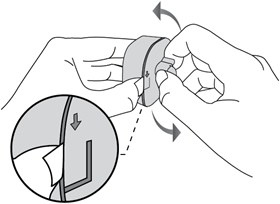
- Lift the clip on the back, then use your other hand to turn the cover anticlockwise and take it off.
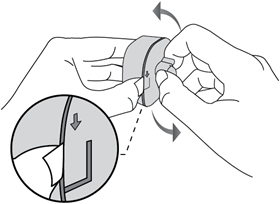
- Take out the depleted battery.
- Place the new battery in the compartment, keeping it level and positive side up.
- Refit the cover securely.
Tapo Door/Window Sensor
- Open the cover using the method appropriate to its installation:
- Not yet installed on a door or window: Lift the clip with a screwdriver while sliding the cover down with your other hand.
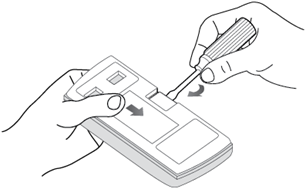
- Already installed on a door or window: Push the cover upward to remove it.
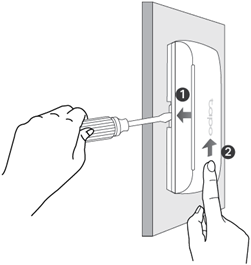
- Not yet installed on a door or window: Lift the clip with a screwdriver while sliding the cover down with your other hand.
- Undo the screw holding the battery in place, then take out the old battery.
- Fit the replacement battery into the compartment, level and with its positive side facing up.
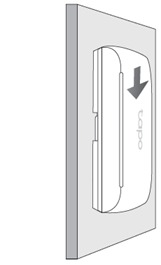
- Slide the cover downward to secure it again.
Tapo Human Presence Sensor
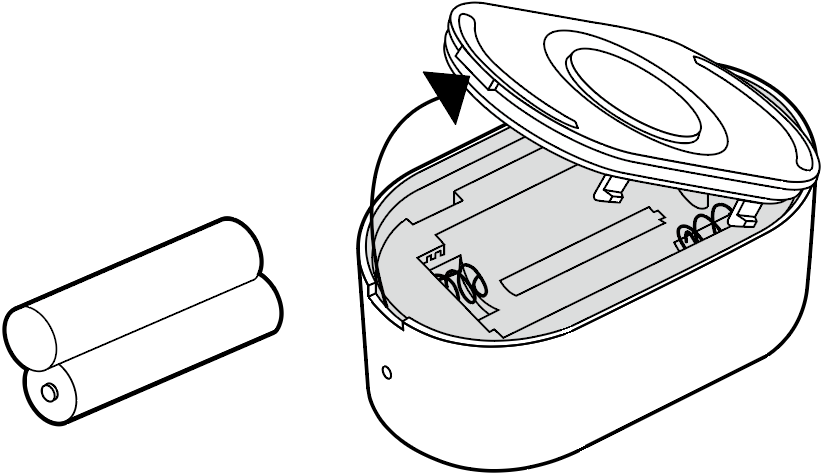
- Take off the rear cover.
- Exchange the old batteries for new batteries (AAA/LR03).
For further details about functions and configuration, download your product manual from the Download Center.