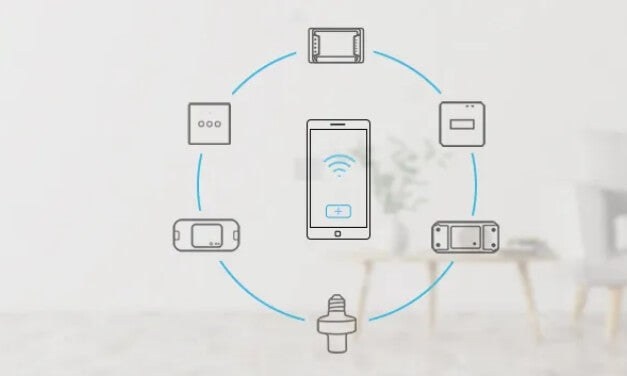
SONOFF products use different pairing methods, so the steps for connecting them to the eWeLink APP depend on the model. This reference covers entering and restarting pairing mode, along with the indicators that confirm device status.
The range includes devices such as DUALR3, D1, USB smart adaptors, L1 and 4CHR3/4CHPROR3. Their applications include music-responsive L1 lighting and scheduled D1 bedroom lighting at 30% brightness.
Note: In quick (Touch) and compatible (AP) pairing modes, the Wi-Fi LED flashes either blue or green. The instructions below therefore describe the pattern without specifying either color.
Pairing methods by device
Bluetooth pairing: DUALR3
- Power on DUALR3 for its first use; it enters “Bluetooth pairing mode”.
Quick pairing: switches, plugs and bridges
These instructions apply to TH10/16, DUALR2, BASICR2, RFR2, PORW2, BASICR3/RFR3, MINIR2, 4CHR3/4CHPROR3, S31, S20, S26, TX series, T4EU1C, IW100/101, S55, SlampherR2, RF Bridge and ZBBridge.
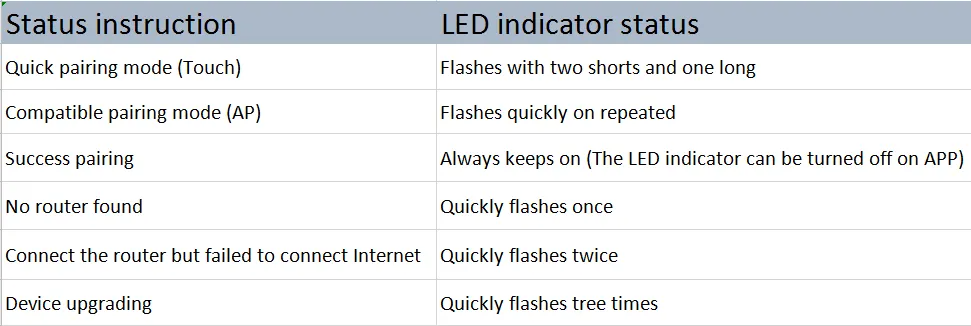
- On first power-up, the device enters “Quick pairing mode”. The Wi-Fi LED repeats two short flashes followed by one long flash.
- If pairing is not completed within 3mins, the device leaves this mode. Hold the pairing button for 5s to restart it; the same LED pattern returns.
Quick pairing: iFan03
- On first power-up, iFan03 enters “Quick pairing mode”, sounding two short beeps followed by one long beep.
- If it is not paired within 3mins, pairing mode ends. Hold the pairing button on RM433 or the device for 5s to re-enter; two short beeps and one long beep confirm the change.
Micro, ZBMINI, BASICZBR3 and S31 Lite zb
- At first power-up, pairing mode starts and the LED flashes rapidly.
- To start pairing again, hold the manual switch for 5s until the signal LED flashes rapidly.
SNZB-01/02/03/04 and DW2-Wi-Fi
- Hold the “RST” button for 5s to initiate pairing. The LED flashes 3 times; for DW2-Wi-Fi, the indicator flashes rapidly.
D1
- On first power-up, D1 enters pairing mode and the bulb repeatedly cycles from dim to bright.
- Pairing mode ends after 3mins without a connection. Switch the power off and back on to restart it; the bulb resumes its dim-to-bright cycle.
B02-F-A60, B02-F-ST64, B02-B-A60 and B05-B-A60
- At first power-up, the bulb enters pairing mode, repeatedly changing from dim to bright.
- If pairing is not completed within 3mins, the mode ends. Operate the manual switch 3 times at intervals of 1s to restart pairing; the dim-to-bright cycle returns.
L1 and l1 Lite
- Hold the remote controller’s “ON” button for 5s. The flashing light strip indicates quick pairing mode.
- If no pairing occurs within 3mins, the mode ends. Hold the same button for 5s again to restart it; the strip flashes again.
GK-200MP2-B
- On first power-up, a voice prompt indicates that pairing mode is active.
- After pairing mode ends, hold “Reset” for 3s to restart it. A voice prompt containing “reset success” confirms the reset.
DW2-RF
- Move the magnet more than 20 mm away from the transmitter to initiate pairing. The LED stays lit for 1-2s.
PIR3-RF
- Briefly press the pairing button or trigger motion detection to enter pairing mode. The LED flashes red and remains lit for 1s.
QR code pairing
Micro also supports pairing by scanning a QR code.
Understanding Wi-Fi LED status
Use the following reference to interpret the device’s Wi-Fi LED indication.